A Model Context Protocol server that enables LLMs to interact with MongoDB databases.
Created 1 year ago
A Model Context Protocol server that enables LLMs to interact with MongoDB databases.
What is A Model Context Protocol server that enables LLMs to interact with MongoDB databases.?
This server provides capabilities for inspecting collection schemas and executing MongoDB operations through a standardized interface. It includes features like smart ObjectId handling, flexible configuration, read-only mode, and LLM integration.
Documentation
MCP MongoDB Server




A Model Context Protocol server that enables LLMs to interact with MongoDB databases. This server provides capabilities for inspecting collection schemas and executing MongoDB operations through a standardized interface.
Demo
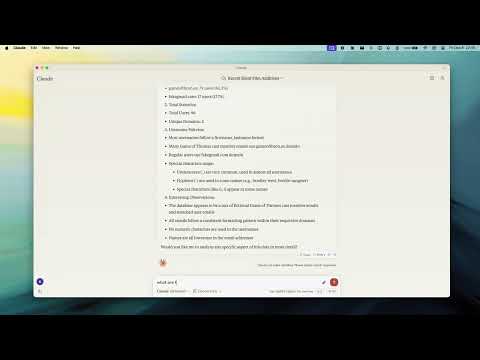
Key Features# Smart ObjectId Handling
- Intelligent conversion between string IDs and MongoDB ObjectId
- Configurable with
objectIdModeparameter: "auto": Convert based on field names (default)"none": No conversion"force": Force all string ID fields to ObjectId
Flexible Configuration
- Environment Variables:
MCP_MONGODB_URI: MongoDB connection URIMCP_MONGODB_READONLY: Enable read-only mode when set to "true"- Command-line Options:
--read-onlyor-r: Connect in read-only mode
Read-Only Mode
- Protection against write operations (update, insert, createIndex)
- Uses MongoDB's secondary read preference for optimal performance
- Ideal for safely connecting to production databases
MongoDB Operations
- Read Operations:
- Query documents with optional execution plan analysis
- Execute aggregation pipelines
- Count documents matching criteria
- Get collection schema information
- Write Operations (when not in read-only mode):
- Update documents
- Insert new documents
- Create indexes
LLM Integration
- Collection completions for enhanced LLM interaction
- Schema inference for improved context understanding
- Collection analysis for data insights
Installation# Global Installation
npm install -g mcp-mongo-server
For Development
git clone https://github.com/kiliczsh/mcp-mongo-server.git
cd mcp-mongo-server

# Install dependencies
npm install

# Build
npm run build

# Development with auto-rebuild
npm run watch
Usage# Basic Usage
npx -y mcp-mongo-server mongodb://muhammed:kilic@localhost:27017/database

# Connect in read-only mode
npx -y mcp-mongo-server mongodb://muhammed:kilic@localhost:27017/database --read-only
Environment Variables
You can configure the server using environment variables, which is particularly useful for CI/CD pipelines, Docker containers, or when you don't want to expose connection details in command arguments:
export MCP_MONGODB_URI="mongodb://muhammed:kilic@localhost:27017/database"

# Enable read-only mode
export MCP_MONGODB_READONLY="true"

# Run server (will use environment variables if no URI is provided)
npx -y mcp-mongo-server
Using environment variables in Claude Desktop configuration:
{
  "mcpServers": {
    "mongodb-env": {
      "command": "npx",
      "args": [
        "-y",
        "mcp-mongo-server"
      ],
      "env": {
        "MCP_MONGODB_URI": "mongodb://muhammed:kilic@localhost:27017/database",
        "MCP_MONGODB_READONLY": "true"
      }
    }
  }
}
Using environment variables with Docker:
docker build -t mcp-mongo-server .

# Run
docker run -it -d -e MCP_MONGODB_URI="mongodb://muhammed:kilic@localhost:27017/database" -e MCP_MONGODB_READONLY="true" mcp-mongo-server

# or edit docker-compose.yml and run
docker-compose up -d
Integration with Claude Desktop# Manual Configuration
Add the server configuration to Claude Desktop's config file:
MacOS: ~/Library/Application Support/Claude/claude_desktop_config.json
Windows: %APPDATA%/Claude/claude_desktop_config.json
Command-line Arguments Approach:
{
  "mcpServers": {
    "mongodb": {
      "command": "npx",
      "args": [
        "-y",
        "mcp-mongo-server",
        "mongodb://muhammed:kilic@localhost:27017/database"
      ]
    },
    "mongodb-readonly": {
      "command": "npx",
      "args": [
        "-y",
        "mcp-mongo-server",
        "mongodb://muhammed:kilic@localhost:27017/database",
        "--read-only"
      ]
    }
  }
}
Environment Variables Approach:
{
  "mcpServers": {
    "mongodb": {
      "command": "npx",
      "args": [
        "-y",
        "mcp-mongo-server"
      ],
      "env": {
        "MCP_MONGODB_URI": "mongodb://muhammed:kilic@localhost:27017/database"
      }
    },
    "mongodb-readonly": {
      "command": "npx",
      "args": [
        "-y",
        "mcp-mongo-server"
      ],
      "env": {
        "MCP_MONGODB_URI": "mongodb://muhammed:kilic@localhost:27017/database",
        "MCP_MONGODB_READONLY": "true"
      }
    }
  }
}
GitHub Package Usage:
{
  "mcpServers": {
    "mongodb": {
      "command": "npx",
      "args": [
        "-y",
        "github:kiliczsh/mcp-mongo-server",
        "mongodb://muhammed:kilic@localhost:27017/database"
      ]
    },
    "mongodb-readonly": {
      "command": "npx",
      "args": [
        "-y",
        "github:kiliczsh/mcp-mongo-server",
        "mongodb://muhammed:kilic@localhost:27017/database",
        "--read-only"
      ]
    }
  }
}
Integration with Windsurf and Cursor
The MCP MongoDB Server can be used with Windsurf and Cursor in a similar way to Claude Desktop.
Windsurf Configuration
Add the server to your Windsurf configuration:
{
  "mcpServers": {
    "mongodb": {
      "command": "npx",
      "args": [
        "-y",
        "mcp-mongo-server",
        "mongodb://muhammed:kilic@localhost:27017/database"
      ]
    }
  }
}
Cursor Configuration
For Cursor, add the server configuration to your settings:
{
  "mcpServers": {
    "mongodb": {
      "command": "npx",
      "args": [
        "-y",
        "mcp-mongo-server",
        "mongodb://muhammed:kilic@localhost:27017/database"
      ]
    }
  }
}
You can also use the environment variables approach with both Windsurf and Cursor, following the same pattern shown in the Claude Desktop configuration.
Automated Installation
Using Smithery:
npx -y @smithery/cli install mcp-mongo-server --client claude
Using mcp-get:
npx @michaellatman/mcp-get@latest install mcp-mongo-server
Available Tools# Query Operations
- query: Execute MongoDB queries
{ collection: "users", filter: { age: { $gt: 30 } }, projection: { name: 1, email: 1 }, limit: 20, explain: "executionStats" // Optional } - aggregate: Run aggregation pipelines
{ collection: "orders", pipeline: [ { $match: { status: "completed" } }, { $group: { _id: "$customerId", total: { $sum: "$amount" } } } ], explain: "queryPlanner" // Optional } - count: Count matching documents
{
  collection: "products",
  query: { category: "electronics" }
}
Write Operations
- update: Modify documents
{ collection: "posts", filter: { _id: "60d21b4667d0d8992e610c85" }, update: { $set: { title: "Updated Title" } }, upsert: false, multi: false } - insert: Add new documents
{ collection: "comments", documents: [ { author: "user123", text: "Great post!" }, { author: "user456", text: "Thanks for sharing" } ] } - createIndex: Create collection indexes
{
  collection: "users",
  indexes: [
    {
      key: { email: 1 },
      unique: true,
      name: "email_unique_idx"
    }
  ]
}
System Operations
- serverInfo: Get MongoDB server details
{
  includeDebugInfo: true  // Optional
}
Debugging
Since MCP servers communicate over stdio, debugging can be challenging. Use the MCP Inspector for better visibility:
npm run inspector
This will provide a URL to access the debugging tools in your browser.
Running evals
The evals package loads an mcp client that then runs the index.ts file, so there is no need to rebuild between tests. You can load environment variables by prefixing the npx command. Full documentation can be found here.
OPENAI_API_KEY=your-key npx mcp-eval src/evals/evals.ts src/schemas/tools.ts
License
This MCP server is licensed under the MIT License. This means you are free to use, modify, and distribute the software, subject to the terms and conditions of the MIT License. For more details, please see the LICENSE file in the project repository.
Server Config
{
  "mcpServers": {
    "a-model-context-protocol-server-that-enables-llms-to-interact-with-mongodb-databases.-server": {
      "command": "npx",
      "args": [
        "a-model-context-protocol-server-that-enables-llms-to-interact-with-mongodb-databases."
      ]
    }
  }
}